
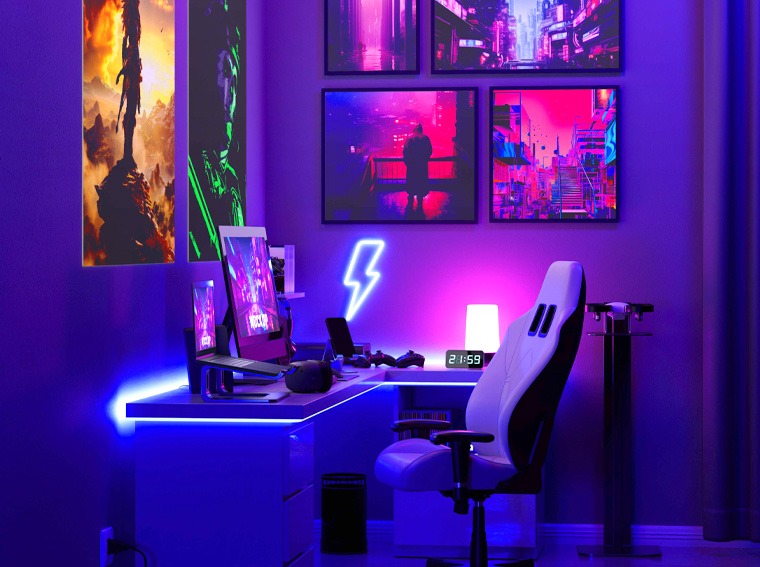
Your gaming setup probably took weeks to put together. The monitor, the peripherals, and the chair that cost more than you’d like to admit. But the lighting? Most gamers treat it like an afterthought, and it shows.
Bad lighting washes out your screen, strains your eyes during those 4 AM sessions, and turns a carefully curated setup into a dim mess that looks identical to everyone else’s. Good lighting flips that. It separates a bedroom with a PC from a space that feels distinctly yours.
Two options own the gaming lighting conversation right now: custom neon signs and RGB LED strips. They solve different problems, cost different amounts, and produce very different atmospheres. This guide compares the two across six real-world factors so you can figure out which one fits your room, budget, and style.
Why Gaming Room Lighting Makes or Breaks Your Setup
Lighting is the cheapest upgrade that changes how your entire room looks on camera and in person. Swap the overhead fluorescent for a warm backlight, and the same IKEA desk suddenly passes for a proper battlestation.
There’s a practical side to this, too. Ambient lighting (the soft, indirect glow behind or around your monitor) reduces the contrast between a bright screen and a dark room. That contrast is what causes eye fatigue over long sessions. Bias lighting, which sits directly behind your display, has been shown to reduce perceived eye strain and improve color accuracy by giving your eyes a reference point beyond the screen.
If you stream on Twitch or YouTube, your room is your brand. Viewers form opinions about a channel within seconds, and the background carries a lot of that weight. A strip of LEDs behind your desk reads “gamer.” A mounted neon sign with your channel name reads “this person takes their content seriously.”
Color temperature plays a role, too. Cooler tones (above 5000K) keep you alert during competitive play, while warmer hues (2700K–3000K) help you wind down during casual sessions. Getting this balance right isn’t just cosmetic. It changes how you feel in space.
How Custom Neon Signs Work and Why Gamers Love Them
Modern custom neon signs for gaming room setups aren’t made with the fragile glass tubes your parents remember. Modern versions of neon signs use LED neon flex, a flexible silicone tube with LEDs embedded inside that mimics the classic neon glow without the heat, buzzing, or breakage risk. They run cool to the touch, pull minimal power (typically 12V or 24V), and last around 50,000 to 100,000 hours before the LEDs start dimming.

What draws gamers to them is personalization. You pick the shape, text, color, and size. Want your gamertag in electric blue above your monitor? Done. A silhouette of your favorite game character in pink and purple? Also done. That kind of customization is something RGB strips can’t touch, because strips light surfaces, while neon signs are the focal point themselves.
Neon sign shops like Neon Designs specialize in custom neon signs where you submit your design or text and receive a ready-to-mount sign built on a clear acrylic backboard. Most signs come with pre-drilled holes or adhesive strips, and the power cord plugs into a standard outlet. No electrician required.
The visual payoff is real. A single neon sign on a dark wall creates an immediate focal point that anchors the whole room. It photographs well, streams well, and gives your space an identity that random RGB cycling won’t.
RGB LED Strip Lights for Gaming Rooms: Features, Pros, and Best Use Cases
RGB LED strips are the Swiss army knife of gaming room lighting. Cheap, flexible, and ridiculously versatile. A 5-meter roll from brands like Govee or Philips Hue costs $15 to $80, depending on the feature set, and you can stick them behind monitors, under desks, along ceiling lines, or inside shelving units.

Most modern strips offer app control, voice assistant integration (Alexa, Google Home), and music-sync modes that pulse colors to your game audio or Spotify playlist. Higher-end options like the Govee RGBIC strips use individually addressable LED segments, meaning different parts of the strip can display different colors at once. That’s a big jump over basic strips where the entire roll changes to one color.
Where strips do their best work is creating ambient washes of color across walls and surfaces. They don’t demand attention the way a sign does. Instead, they set a mood. Purple and blue behind your desk. Soft white under your shelves. A reactive red pulse when you’re in a firefight. Subtle environmental design that fills the room without shouting.
The downside? They can look cheap if you don’t hide them well. Exposed adhesive strips with visible LED dots along the edge of a desk scream “budget,” regardless of the brand. Clean installation (inside aluminum channels with diffusers) takes time and a bit of planning, but the difference is night and day.
Custom Neon Signs vs RGB LED Strips: 6 Key Factors Compared
1. Visual Impact
Neon signs win here. They’re a centerpiece. One well-placed sign does more for a room’s character than 10 meters of LED strips ever could. Strips are designed to blend into the background. Neon commands the eye.
2. Cost
RGB strips are the budget-friendly pick. A quality strip setup runs $15–$80 total. Custom neon signs start around $100 for small pieces and climb past $300 for larger or more complex designs. You get what you pay for in both cases, but the entry price gap is real.
3. Customization
Depends on what you mean by “custom.” Strips offer millions of color combinations and dynamic effects, but they all look like strips. Neon signs are custom in shape, text, and form factor. Suppose personalization means “my name on the wall,” neon wins. If it means “I want my desk to glow teal on Tuesdays,” that’s strips.
4. Installation Difficulty
Strips are easier to install but harder to install well. Peeling and sticking take minutes. Making them look polished takes aluminum channels and patience. Neon signs mount with screws or adhesive, plug in, and they’re done. Less placement flexibility, but the result is clean from the start.
5. Durability and Lifespan
Both use LED technology, so their lifespans are comparable at around 30,000–50,000 hours. But the adhesive on cheaper strips tends to give out after 6–12 months, especially in warm rooms. Neon signs, once mounted, stay put. The silicone tubing on quality LED neon flex also holds up better against dust and yellowing than exposed strip LEDs.
6. Energy Consumption
Both are energy-efficient. A typical 5-meter strip draws around 24–60 watts depending on LED density. A medium-sized neon sign draws roughly 15–30 watts. Neither will dent your electricity bill, but neon signs edge out strips slightly in terms of power draw for the visual impact they produce.
Why Gamers Are Upgrading Beyond Basic RGB Lighting Effects
RGB became the default gaming aesthetic over the past decade. Keyboards glow. Mice glow. RAM sticks glow. At some point, everything cycling the same rainbow pattern stopped feeling special and started feeling generic.
That’s the shift happening now. Gamers who care about how their setup looks (and judging by the growth of r/battlestations and setup content on TikTok, there are a lot of them) are moving toward intentional design. Fewer colors, more purpose. A curated palette instead of a full-spectrum light show.
Custom neon signs fit that trend well. They’re a single deliberate statement: your tag, a quote, a symbol. Something that tells visitors and viewers who you are. RGB strips still belong in this setup, but they work best as supporting cast, not the headliner.
The gaming room has evolved from “where I put my PC” to a genuine personal space. And personal spaces deserve lighting with personality, not just a color wheel.
How Custom Neon Signs Enhance Your Streaming Room Aesthetic
If you stream, your background isn’t decoration. Its content. Viewers see it every single frame, and it shapes how they perceive your channel before you say a word.
Neon signs are one of the most effective background elements for streaming because they solve two problems at once. They add a soft, diffused light source that creates depth in your camera shot (no more flat, lifeless backgrounds). And they give your stream a branded identity element that’s visible even in thumbnails.

Placement matters for camera framing. The sweet spot is slightly off-center behind your chair, positioned so it’s in your facecam but not directly behind your head (where it becomes a distracting halo). A lot of streamers mount their sign on the wall to the left or right of their monitor at roughly eye level.
The glow flatters on camera, too. Neon provides a warm, even wash of color that mixes well with your key light. Compared to RGB strips, which can create harsh color spills and uneven gradients in footage, neon reads as smoother and more polished on stream.
Best Places to Position Gaming Room Lights for Maximum Visual Impact
Where you place your lights matters as much as which lights you pick. These positions make the biggest difference:
Behind the monitor: This is bias lighting territory. An LED strip (warm white or soft color) behind your display reduces eye strain and adds depth to your desk area. Keep it subtle.
Above the desk, wall-mounted: The prime spot for a neon sign. Mount it 12–18 inches above your monitor’s top edge for the best visual balance. It stays visible on camera and creates a clean focal point.
Under the desk edge: A hidden LED strip along the front or sides of your desk creates a floating effect that looks great in low light. Use a diffuser channel to avoid visible LED dots on the floor.
Ceiling perimeter: LED strips along the ceiling line wash the walls with indirect color. If you only buy one strip, put it here. It’s the single most impactful placement for overall room ambiance.
Inside shelving or display cases: A short strip inside each shelf turns collectibles, figures, or game cases into display pieces. Warm white works better than RGB here.
How to Combine Custom Neon Signs and RGB LED Strips in Your Gaming Room
The best gaming rooms don’t pick one or the other. They layer both.
Start with a color palette. Pick two or three colors that define your room’s identity and stick with them. If your neon sign is a cool blue, set your LED strips to complementary tones: deep purple accents, soft white backlight, maybe a hint of cyan along the ceiling. Matching everything to the same rainbow cycle defeats the purpose.
Use the neon sign as your anchor. It’s the piece that draws the eye first, so everything else should support it rather than compete with it. Think of it like a painting in a gallery: the frame and lighting exist to make the art look better, not to steal focus.
Then fill in the functional layers with LED strips. Bias lighting behind the monitor for eye comfort. Under-desk strips for ambient glow. Shelf lighting for display. These are your utility lights. They fill the room with atmosphere while the neon sign gives it meaning.
One common mistake: running everything at full brightness. Your neon sign should be the brightest element in the room (aside from your monitor). Dim the strips to 40–60% so they complement rather than overwhelm. Most smart strips let you adjust brightness per zone, so use that.
RGB Strips, Neon Signs, or Both? Final Verdict for Your Gaming Room
If your budget is tight and you want fast, flexible lighting that covers a lot of ground, start with RGB LED strips. They’re affordable, easy to stick up, and they’ll make any setup look better than overhead lighting alone. Govee’s RGBIC line and Philips Hue’s gradient strips are solid starting points.
If you want a single upgrade that transforms your room’s personality, go with a custom neon sign. Nothing else gives you that level of identity at that price point. It’s the difference between a lit room and a room with character.
And if you’re serious about building a setup that looks as good as it performs, combine both. A neon sign as the anchor, LED strips as the supporting atmosphere. That’s the formula behind the setups that actually stop people mid-scroll.
Good lighting isn’t about spending the most money or cramming in the most LEDs. It’s about being intentional with what you place, where you place it, and why. Your gaming room is your space. Light it like you mean it.