

Why Your Best Gaming Chairs for Back Pain Worse
Let me say something that most gaming chair guides skip entirely. The chair you are currently sitting in is probably the number one reason your back hurts after gaming. Not your posture. Not your monitor height. Not your desk setup. Your chair.
Here is the reality. Most budget gaming chairs are built around aesthetics the racing-style look, the bold colors, the aggressive bolstering not around the biomechanics of the human spine. They look like they belong in a race car cockpit. They do not function like something that supports your back through four, six, or eight hours of gaming.
Poor lumbar support is the leading cause of gaming back pain. When your lower spine is not properly supported, it collapses into a C-shape what physiotherapists call a posterior pelvic tilt. Over hours, this position compresses the discs in your lumbar spine, stretches the ligaments in your lower back, and activates muscle tension that builds up into genuine pain. The longer you sit in poor posture, the worse it gets. And the worst part? It compounds. One bad day in a bad chair leads to a week of lingering stiffness.
The good news is that the right gaming chair genuinely makes a difference. Not a marketing claim a measurable, day-one difference in how your back feels after long gaming sessions.
In this guide, I reviewed 4 of the best gaming chairs for back pain available on Amazon in 2026. Every pick was chosen specifically for its ergonomic features, lumbar support quality, and real-world comfort during long sessions. Let me show you exactly what to get.
As an Amazon Associate, we earn from qualifying purchases.
You might also want to read:
What Makes a Gaming Chair Good for Back Pain?
Before I get into the products, here are the five features that separate a genuinely ergonomic gaming chair from one that just looks the part.
1. Adjustable Lumbar Support Built-in is Better External pillows slide around, lose firmness, and fall off. Built-in integrated lumbar systems stay exactly where you position them and apply consistent, targeted pressure to your lower back. For back pain specifically, built-in lumbar always wins.
2. Seat Depth The Most Overlooked Feature If the seat is too deep, the front edge presses into the back of your thighs, cutting off circulation and causing your pelvis to tilt backwards. Look for chairs where you can sit with your back fully against the backrest while your feet rest flat on the floor with a 2-3 finger gap behind your knees.
3. 4D Armrests Your Shoulders Will Thank You Wrong armrest height causes you to hunch your shoulders one of the leading causes of upper back and neck pain. 4D armrests adjust in height, width, depth, and angle to place your elbows exactly where they need to be.
4. Recline with Multi-Position Lock Staying in one position for hours is problematic regardless of how good that position is. A chair with a multi-position recline lock lets you shift your posture throughout a gaming session distributing spinal pressure instead of concentrating it in one area.
5. High Density Foam Not Cheap Padding Budget chair foam compresses within months, leaving you sitting on a hard base with no cushioning. Cold-cure or high-density foam maintains its shape and support under daily use for years the difference is significant for long-term back pain prevention.
Quick Comparison 4 Best Gaming Chairs for Back Pain 2026
| # | Chair | Price | Lumbar Type | Best For |
| 1 | Secretlab Titan Evo | $729.00 | Built-in 4-way | Best Overall |
| 2 | GTPLAYER Bluetooth | $149.97 | Adjustable pillow + footrest | Best Budget |
| 3 | LiberNovo Omni Dynamic | $848.00 | Dynamic motorized adaptive | Best for Chronic Pain |
| 4 | Razer Iskur V2 X | $399.99 | Integrated lumbar arch | Best for Posture |
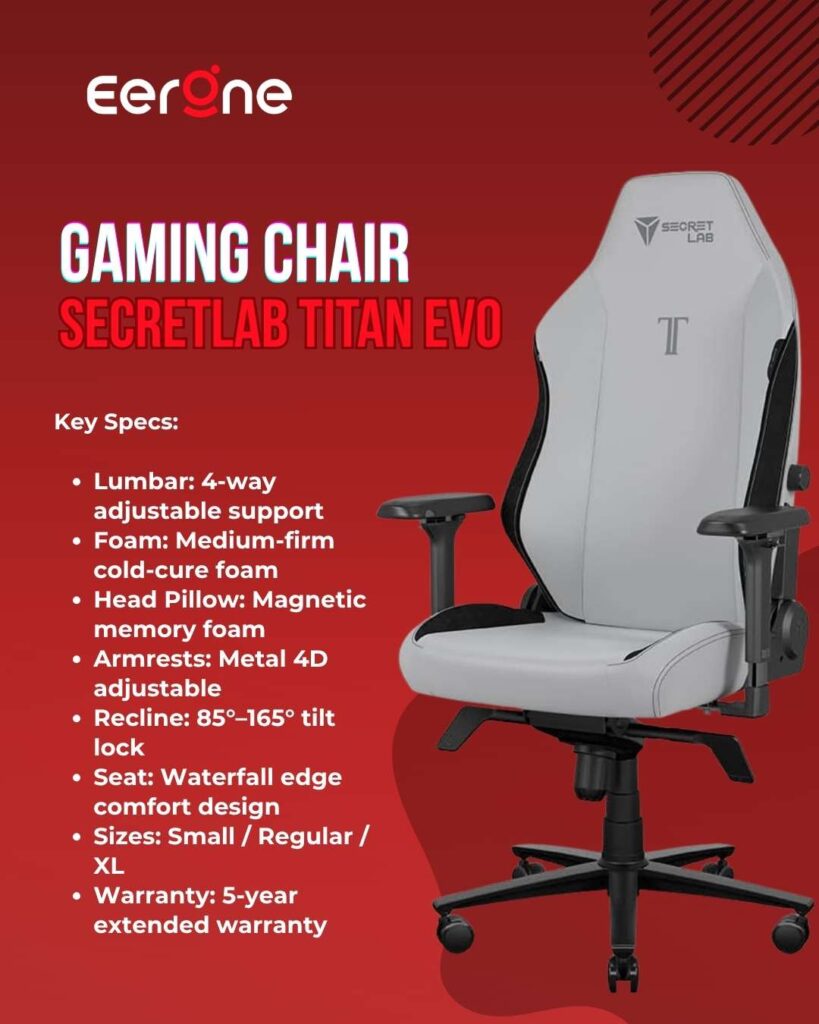
1. Secretlab Titan Evo Best Overall Gaming Chair for Back Pain
4.5 ★★★★★ 4.5 out of 5 stars (405)
Who Should Buy the Secretlab Titan Evo? The Titan Evo is the right choice for any gamer who experiences lower back pain regularly during or after gaming sessions and wants a long-term solution. The Secretlab Titan Evo offers the best balance of ergonomics, durability, and price of any gaming chair available in 2026. If you can stretch to this price point buy it once, buy it right, and stop thinking about your chair.
As someone who spent twelve months complaining about lower back pain while neglecting to do anything about it, the Secretlab Titan Evo’s built-in 4-way lumbar support finally provided genuine relief. That is not a marketing quote that is a real reviewer describing their first-hand experience with this chair. I share it because it captures exactly why the Titan Evo earned the top spot on this list.
The Secretlab Titan Evo occupies an unusual position: it is built and adjusted like a real ergonomic chair, priced well below the Herman Miller and Steelcase tier, and designed around a sitting style that most premium ergonomic chairs do not accommodate well. For gamers who recline frequently and want a chair that handles both gaming and desk work it is genuinely competitive in ways that most gaming chairs simply are not.
Why the Built-In Lumbar is a Game Changer
The Titan Evo has three standout features. First, its integrated, height-and-depth adjustable lumbar provides more precise lower back support than every high-end office chair on the market. Height and depth. Both adjustable. Independently. This is the critical distinction. Most chairs let you adjust the height of a lumbar pillow. The Titan Evo lets you control exactly how far the lumbar support protrudes into your lower back allowing you to dial in the exact pressure your spine needs, not just the approximate position.
When you sit still, pressure builds up in a single area. Movement relieves stress on your body. As you change postures, stress is distributed more evenly, preventing pain and discomfort. The Titan Evo supports your body’s natural tendency to move with versatile adjustments that can be tailored to you, it adapts as you move throughout your day.
Cold-Cure Foam Why It Matters Long Term
Most budget gaming chairs use standard foam that compresses and flattens within 6-12 months of regular use. Once the foam goes, you are sitting on a hard base with zero cushioning significantly worsening back pain over time. The Titan Evo uses Secretlab’s proprietary cold-cure foam that is deliberately engineered to be medium-firm high-performance, responsive cushioning for all-day comfort, for the perfect blend of comfort and support. It does not flatten. It does not sag. After four years of daily use it still performs like new.
Magnetic Memory Foam Head Pillow
The magnetic headrest offers a massive adjustment range to perfectly support your neck. The pillow holds in place with magnets instead of straps, providing an 11-inch adjustment range. Neck and upper back pain during gaming is often caused by a poorly positioned head pillow that forces your head into an awkward angle. The magnetic system on the Titan Evo stays exactly where you put it no slipping, no re-adjustment required.
Full Metal 4D Armrests
The 4D armrests can be shifted forward and backward, side to side, up and down, or at an angle. Three of these functions are controlled via two easy-to-access buttons under the armrest, while moving them inward or outward stays locked in position. Getting armrests at exactly desk height relaxes your shoulders completely eliminating one of the most common sources of upper back and neck tension during long gaming sessions.
Sizes and Compatibility
The Secretlab Titan Evo comes in 3 different sizes. Size XL is recommended for people between 5’11” to 6’9″ and 175lbs to 395lbs. With over 3,000,000 users worldwide and more than 50 Editor’s Choice awards, the brand also offers a 5-year extended warranty for extra peace of mind.
Pros:
- Best lumbar system on this list height AND depth adjustable
- Cold-cure foam maintains support for years
- Three sizes fits nearly every body type
- Magnetic head pillow 11-inch adjustment range
- Full metal 4D armrests precise positioning
- 5-year warranty industry leading
- 3 million+ users worldwide proven at scale
Cons:
- Premium price at ~$359
- Leatherette version gets warm in hot environments consider SoftWeave Plus
- Assembly takes 30-45 minutes
- Size tip: if you are at the upper end of height or weight range, size up to XL
Who Should Buy the Secretlab Titan Evo? The Titan Evo is the right choice for any gamer who experiences lower back pain regularly during or after gaming sessions and wants a long-term solution. The Secretlab Titan Evo offers the best balance of ergonomics, durability, and price of any gaming chair available in 2026. If you can stretch to this price point buy it once, buy it right, and stop thinking about your chair.
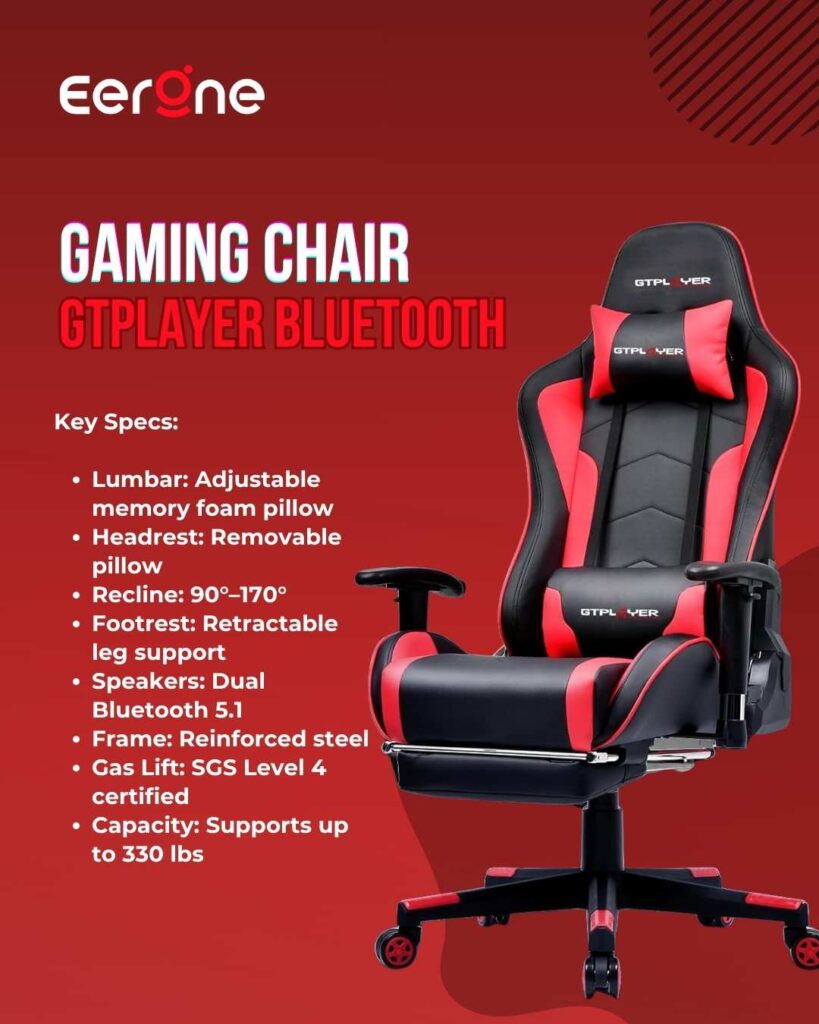
2. GTPLAYER Gaming Chair with Bluetooth Speakers for Back Pain
4.4 ★★★★☆ 4.4 out of 5 stars (400)
Who Should Buy the GTPLAYER? The GTPLAYER is the right chair for budget-conscious gamers who experience mild to moderate back pain and want a footrest, Bluetooth audio immersion, and decent lumbar support without spending $300 or more. If you are upgrading from a basic task chair or dipping into gaming seats for the first time, the GTPLAYER is a friendly entry point to ergonomic comfort without the wallet pain.
Not everyone can spend $350 on a gaming chair. I understand that completely and I want to make sure there is a genuinely good option for gamers on a tighter budget too. The GTPLAYER Bluetooth Gaming Chair is the best budget gaming chair for back pain on Amazon in 2026. It is not perfect. But at around $180, it delivers a surprising combination of ergonomic features, comfort, and a uniquely immersive Bluetooth speaker system that sets it apart from every other chair in this price range.
Ergonomic Features for Back Pain
The GTPLAYER gaming chair features an ergonomic high backrest, a removable headrest and lumbar cushion, and padded armrests for a perfect sitting experience. The maximum inclination angle of the backrest is 170°, and it has adjustable height and a retractable footrest for maximum relaxation.
The retractable footrest is a feature that deserves specific attention for back pain sufferers. When you extend your legs onto a footrest during gaming, you relieve compression on your lumbar spine the same pressure that builds up and causes lower back pain during long sessions. Most chairs at this price simply do not include a footrest. The GTPLAYER does, and for back pain specifically, that matters.
The widened wing backrest, along with high-density memory foam headrest and lumbar support, follows ergonomics precisely supporting head, neck, shoulders, back, waist, buttocks and legs. It can disperse 95% of body pressure and relieve long-sitting fatigue.
The Bluetooth Speaker Feature
The dual Bluetooth 5.1 speakers deliver remarkable and richly detailed stereo sound with solid bass and clear treble connecting wirelessly to smartphones, tablets, or other Bluetooth-enabled devices for music, mobile gaming, or movies with cinema-like sound.
Why does a speaker system matter for back pain? Because it means you can enjoy audio immersion without wearing a headset eliminating the neck and shoulder weight that heavy gaming headsets contribute to upper back fatigue over long sessions. It is a small detail, but for gamers who game for four or five hours at a stretch, headset weight adds up into genuine muscle tension.
Build Quality and Stability
The GTPLAYER gaming chair features an SGS-certified level 4 gas lift and a reinforced steel frame, ensuring exceptional durability and reliability with a maximum weight capacity of 330 lbs. The SGS certification on the gas lift is important it means the cylinder has been independently tested for safety and load-bearing reliability. Many budget chairs skip this certification, leading to gas lifts that slowly sink or fail under regular use.
Pros:
- Best budget option for back pain under $200
- Retractable footrest reduces lumbar compression
- Dual Bluetooth 5.1 speakers immersive audio without headset
- SGS-certified gas lift safety verified
- 170° recline full relaxation position
- High-density memory foam lumbar and headrest
Cons:
- Lumbar is pillow-based not built-in like Secretlab
- Pillow can shift during gaming sessions needs occasional repositioning
- Bluetooth speakers are not audiophile quality
- PU leather may show wear after 2 years of heavy daily use
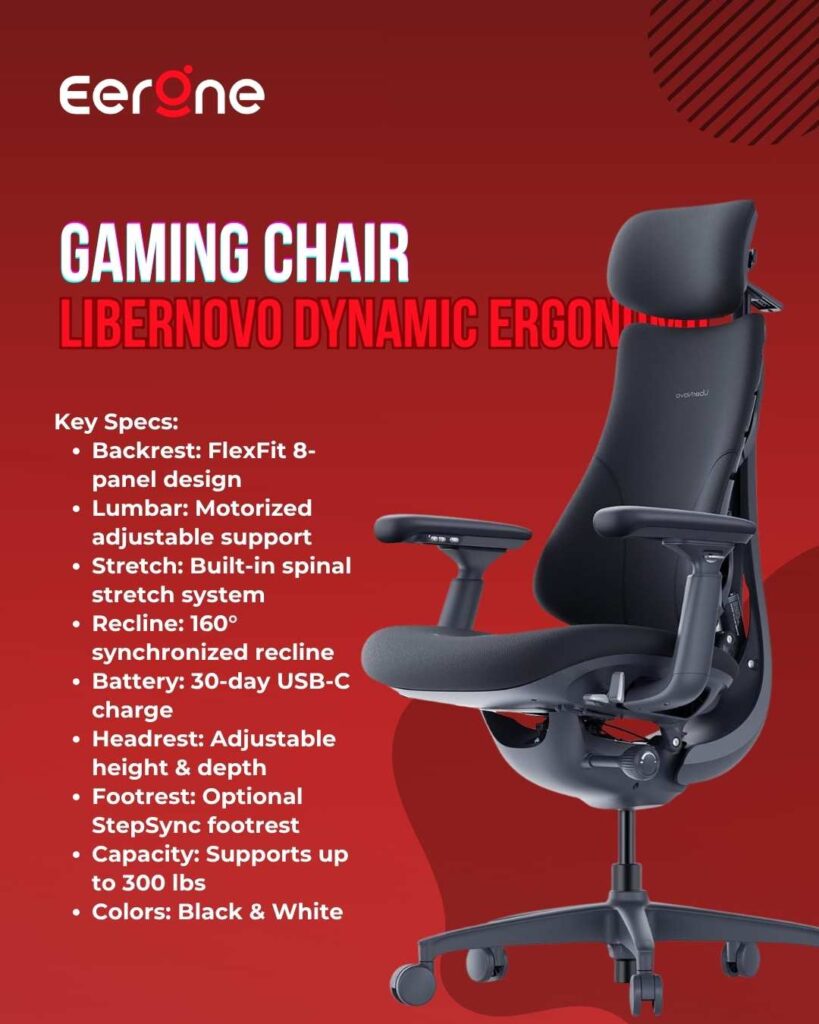
3. LiberNovo Dynamic Ergonomic Chair Best for Chronic Back Pain
3.4 ★★★☆☆ 3.4 out of 5 stars (86)
Who Should Buy the LiberNovo Omni? The Omni is for gamers with genuine, persistent chronic back pain who have tried conventional chairs and not found sufficient relief. Its dynamic backrest, multi-density cushioning, and adjustable components make it ideal for maintaining comfort and posture during extended gameplay and the price places it in a premium category that the build quality and technological features fully justify.
PC Gamer named the LiberNovo Omni as their pick for the best high-end gaming chair in March 2026 replacing the Herman Miller x Logitech G Embody at half the price. That endorsement alone tells you everything you need to know about how seriously the ergonomic gaming chair world is taking the LiberNovo Omni. This is not just a gaming chair with good lumbar support. It is the world’s first dynamic ergonomic chair and for gamers with genuine chronic back pain, it is a genuinely revolutionary product.
The Bionic FlexFit Backrest What Makes It Different
The Omni is built entirely around dynamic support rather than just simple padding and nice fabrics. The segmented backrest not only looks like the chair has its own spine it also moves and flexes with your spine as you lean or recline, actively maintaining contact with your lumbar at all times.
Every other chair on this list including the Secretlab Titan Evo uses a static backrest. You adjust the lumbar support once, and it stays there. The LiberNovo Omni’s eight-panel segmented backrest moves independently with your spine as you shift, lean, and recline. It does not wait for you to adjust it. It adjusts itself, continuously, in real time. For gamers who move a lot during gaming sessions, this is transformative for back pain management.
Motorized Lumbar Technology That Changes Everything
The LiberNovo Omni features motorized lumbar adjustment and a spinal massage feature that are not commonly found in traditional ergonomic chairs. The battery powering the motorized system lasts around 30 days with regular use before needing a recharge and the cartridge-style battery charges via USB-C.
A simple button press moves the lumbar support forward or backward no manual twisting, no reaching around the chair. For gamers with chronic lower back pain who find manual lumbar adjustment difficult or frustrating, this motorized system removes friction completely. You find your comfort and stay there.
The LiberNovo Omni is one of the most ambitious ergonomic chairs in its price bracket, combining real comfort with dynamic support that adapts to your body. Its reclining system and motorized lumbar and stretch features make it especially compelling for anyone who spends long hours at a desk.
The OmniStretch Feature
The OmniStretch feature is a slow, deliberate stretch across your lower back that is both relaxing where you might have to fight sleep and invigorating, giving a second wind especially when paired with the optional StepSync footrest that has you fully reclined.
As someone who games for long sessions, having a built-in stretch feature that decompresses your lumbar spine mid-session is genuinely useful for back pain management. Most chairs require you to get up and stretch. The Omni does it for you.
Tom’s Hardware and PC Gamer Verdict
The LiberNovo Omni does what it sets out to do deliver an extremely comfortable, ergonomic experience on par with high-end task chairs, but for quite a bit less than the premium alternatives.
LiberNovo’s Omni is a bold leap forward a chair that tries to adapt to you, not the other way around.
Pros:
- World’s first dynamic ergonomic chair backrest moves with you
- Motorized lumbar no manual adjustment needed
- Built-in OmniStretch decompresses lumbar mid-session
- PC Gamer #1 high-end gaming chair pick 2026
- Comfortable for 6-8 hour sessions without fatigue
- Half the price of previous top pick Herman Miller x Logitech G Embody
- 5-year frame warranty 2-year electronic components warranty
Cons:
- Premium price ~$929
- Motorized system longevity unknown over 5+ years
- PC/office aesthetic not traditional gaming chair look
- Not currently available at all Amazon regions check availability
- Armrests follow arm movement some users prefer fixed armrests
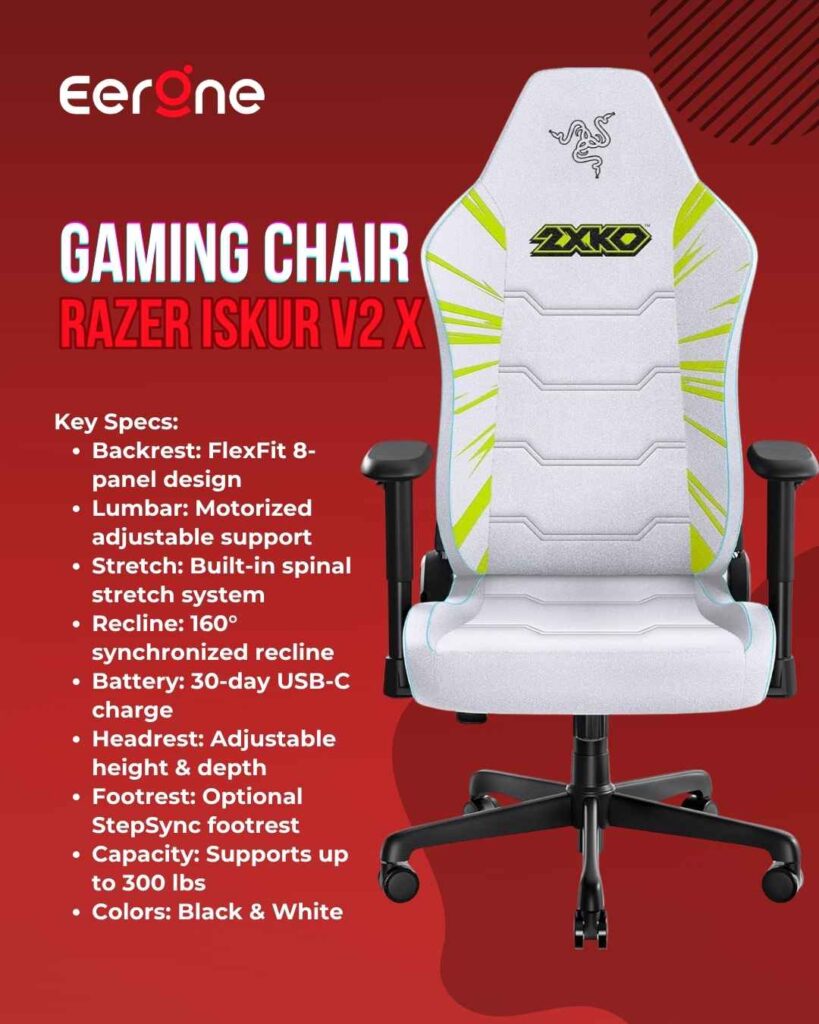
4. Razer Iskur V2 X Ergonomic Best Gaming Chair for Posture Correction and Back Pain
3.4 ★★★☆☆ 3.4 out of 5 stars (86)
Who Should Buy the Razer Iskur V2 X? The Iskur V2 X is the right chair for gamers who want a genuine integrated lumbar system at a price below the Secretlab Titan Evo. If removable lumbar pillows have frustrated you and you want lumbar support that simply stays put this is your chair. At $299, it is the most focused back-pain solution on this list for its price point.
The lumbar support on the Razer Iskur V2 made a huge difference personally finishing a full day of work without an aching back after settling into this chair. The Razer Iskur V2 X takes everything that made the full V2 excellent and makes it accessible at a more approachable price point without compromising on the most important feature: the integrated lumbar arch that makes this chair genuinely special for back pain sufferers.
The Integrated Lumbar Arch Posture Correction Built In
The Razer Iskur V2 X is designed with an integrated lumbar arch that gently supports your lower back and encourages a neutral sitting position, minimizing back fatigue over long periods. Sculpted with reduced edges to guide your body towards the centre for optimal pressure distribution.
The key word here is integrated. The lumbar support on the Iskur V2 X is built directly into the structure of the backrest not a removable pillow, not an external attachment. It cannot slip. It cannot fall off. It does not need to be repositioned every hour. It simply exists where your lower back needs it, every single session. For gamers who are frustrated with removable lumbar pillows that require constant adjustment the Iskur V2 X eliminates that frustration entirely.
Widened Seat Base Reducing Thigh Pressure
Experience a greater level of lower body support and stability with thick cushion padding that reduces pressure and molds to your unique body shape, with a widened seat base of up to 545mm.
A wider seat base means less pressure on the outside of your thighs, better weight distribution, and less restriction on natural leg movement during long sessions. This contributes directly to lower back health when your legs are properly supported, your pelvis sits in a more neutral position, which in turn reduces lumbar compression.
High-Density Cold-Cure Foam
The Iskur V2 X NewGen uses a high-density cold-cured foam seat cushion formed as a single solid piece, which resists shifting and sagging while distributing your weight evenly for long-lasting comfort. A single-piece cold-cure foam cushion cannot develop soft spots or uneven wear over time. The support you experience on day one is the support you get on year two. For back pain sufferers, this consistency is genuinely important.
Professional Endorsement
The Razer Iskur V2 NewGen was named the Official Gaming Chair of VCT EMEA and Game Changers EMEA starting in 2026 equipping EMEA’s top VALORANT players with a seating platform built for endurance, stability, and long match days under pressure. When the world’s best competitive gamers sit in this chair for 8-10 hours during tournament play, back pain cannot be a factor. That endorsement carries genuine weight.
Windows Central Verdict
The Razer Iskur V2 X offers a wide range of options to adjust its seating position, the seat cushioning and armrests feel comfortable to use, and it has an affordable MSRP that makes it more enticing than pricier chairs. The Razer Iskur V2 X was a sigh of relief for my back, thanks to its solid and comfortable materials with an ergonomic design.
Pros:
- Integrated lumbar cannot slip, fall, or require repositioning
- Posture-first design corrects forward head posture over time
- Wide seat base better weight distribution, less thigh pressure
- Single-piece cold-cure foam consistent support for years
- Official chair of professional VALORANT esports 2026
- More affordable than full Iskur V2 same core lumbar system
- Razer brand excellent after-sales support
Cons:
- 2D armrests only not 4D like Secretlab Titan Evo
- Lumbar stiffness during break-in period softens over first few weeks
- No clutch headrest cushion included sold separately
- Not ideal for users above 6’6″ or over 299 lbs
How to Set Up Any Gaming Chair Correctly for Back Pain
The best gaming chair in the world will not help your back if it is set up incorrectly. Here are the five setup steps that matter most.
Step 1 The 90-90-90 Rule
Set your chair height so your feet rest flat on the floor with your knees and hips both at 90-degree angles. Your thighs should be parallel to the floor. This is the starting position for every other adjustment.
Step 2 Lumbar Position
Position your lumbar support at your lower back not your mid back. The correct position is approximately 2-3 inches above your belt line, at the natural inward curve of your lumbar spine. The most common mistake is placing lumbar support too high against your shoulder blades where it does nothing useful for lower back pain.
Step 3 Armrest Height
Set your armrests level with the top of your desk. When your elbows rest naturally on the armrests at this height, your shoulders drop and relax completely eliminating the muscle tension that causes upper back and neck pain during long gaming sessions.
Step 4 Monitor Height
No gaming chair can fix back pain caused by a monitor that is too low or too high. The top of your screen should sit at or slightly below your eye level when you are sitting upright. Looking down at a low monitor for hours creates enormous strain on your cervical spine a monitor arm at the correct height removes this strain entirely.
Step 5 Move Regularly
Every 30-45 minutes, stand up, stretch your lower back, and walk for 60 seconds. No chair regardless of how ergonomic it is eliminates the need to move. Movement distributes spinal compression that builds during sustained sitting. Set a timer if you need to. Your back will feel meaningfully better by the end of the day.
FAQ Best Gaming Chair for Back Pain
Q: Can a gaming chair actually help with back pain? Yes but only if it has proper ergonomic features. A chair with adjustable built-in lumbar support, high-density foam, and correct sizing for your body can meaningfully reduce lower back pain during gaming sessions. The improvement is typically noticeable within the first few days of switching from a budget chair. That said, a chair cannot replace regular movement and correct posture habits. It is one part of the solution.
Q: Is built-in lumbar better than a removable pillow for back pain? For back pain specifically yes, built-in lumbar is significantly better. Removable pillows slip, fall, lose their firmness, and require constant repositioning. Built-in systems stay exactly where you position them and deliver consistent pressure to your lumbar throughout every session. The Secretlab Titan Evo and Razer Iskur V2 X both feature integrated lumbar the LiberNovo Omni takes this even further with a motorized system.
Q: How long should I sit in a gaming chair before taking a break? Medical guidance generally suggests standing and moving every 30-45 minutes for back health. Even the best ergonomic chair cannot eliminate the need for movement during long gaming sessions. Set a recurring timer, stretch your lower back for 60 seconds, then return to gaming. This simple habit can eliminate most gaming-related back pain regardless of which chair you use.
Q: Is the Secretlab Titan Evo worth it for back pain? Yes the Secretlab Titan Evo offers the best balance of ergonomics, durability, and price of any gaming chair currently available. The built-in 4-way lumbar system, cold-cure foam that never sags, and the five-year warranty make it the smartest long-term investment for back pain relief on this list. Buy it once, and stop spending money on budget chairs that worsen the problem.
Q: What is the best gaming chair for back pain under $200? The GTPLAYER Bluetooth Gaming Chair at around $180 is the best option under $200. It includes a retractable footrest that reduces lumbar compression during long sessions, a high-density memory foam lumbar pillow, and an SGS-certified gas lift all at a price that makes genuine ergonomic support accessible on a tight budget.
Q: Can a cheap gaming chair make back pain worse? Yes and this is more common than most guides admit. Racing-style budget chairs with aggressive bolstering, fixed lumbar pillows that cannot be adjusted to your spine’s actual position, and foam that flattens within months can actively worsen back pain by forcing poor spinal alignment for hours at a time. If your current chair causes pain after 30-60 minutes of sitting, it is actively harming your back.
Q: What size gaming chair should I choose for back pain relief? Sizing affects lumbar position significantly. Secretlab’s sizing runs slightly smaller than expected if you are at the upper end of the Regular height or weight range and have a broader frame, size up to XL. The lumbar positioning is sensitive to height, and an undersized chair will put the integrated lumbar in the wrong place regardless of adjustment. When in doubt size up.
Final Verdict Best Gaming Chair for Back Pain 2026
| Pick | Chair | Price | Why |
| Best Overall | Secretlab Titan Evo | $729.00 | 4-way built-in lumbar, cold-cure foam, 5-year warranty |
| Best Budget | GTPLAYER Gaming Chair with Bluetooth | $149.97 | Footrest, Bluetooth speakers, SGS-certified build |
| Best for Chronic Pain | LiberNovo Dynamic Ergonomic | $848.00 | Dynamic motorized adaptive support world’s first |
| Best for Posture | Razer Iskur V2 X Ergonomic | $399.99 | Integrated arch, wide seat, professional esports endorsement |
My overall recommendation for most gamers is the Secretlab Titan Evo. Whether you recline frequently, game for hours, or want a chair that works as well leaned back as it does upright the Titan Evo is genuinely competitive in ways most gaming chairs are not. The built-in 4-way lumbar, the cold-cure foam, the five-year warranty, and the three-size system make it the most complete back pain solution available in a gaming chair format in 2026.
For gamers with serious chronic back pain who want the most technologically advanced support available the LiberNovo Omni is the answer. Nothing else adapts to your body the way it does.
For gamers on a tighter budget the GTPLAYER Bluetooth delivers genuine ergonomic features, a footrest, and Bluetooth audio at a price that makes it the smartest budget option on this list.
Whatever you choose your back is worth the investment. Stop enduring sessions that end in pain. Get a chair that actually supports you. It changes everything.
Shop All Gaming Chairs on Amazon
As an Amazon Associate, Eerone earns from qualifying purchases. Product prices are approximate and subject to change. Always check Amazon for the latest price, availability, and deals.